Why the Clicks Power Keyboard Sent Me Straight Back to the Titan 2 Elite
The Clicks Power Keyboard is a fascinating piece of hardware, but using it for a week didn't make me want to keep typing on an accessory. I am not trying to just dog pile on the device here, because you guys already know from my channel that my review of it wasn't super positive. Really, what I am trying to do is just express how the experience of using that keyboard accessory actually reaffirmed what I truly wanted out of my daily setup. It made me realize how a dedicated, built-from-the-ground-up physical keyboard phone actually makes more sense to me for these tasks. It made me realize how much I missed the utility of my Unihertz Titan 2 Elite, so much so that I ended up pulling the SIM card out of my Razr Fold and moving right back into it.
I was already eyeing the Titan while completing my one-month review cycle for the Razr, and this experience sort of tipped me over the edge.
When you attach a keyboard accessory to a modern slab or a foldable, you are essentially trying to force a device to be something it was never designed to be. The ergonomics instantly become a struggle. You end up with a top-heavy, massive setup that feels awkward in the hand. The Clicks Power Keyboard alone weighs 184g, which is heavier than the entire Titan 2 Elite hardware at 163g.
Because the Clicks Power Keyboard is so heavy and thick when attached to a phone, leaving it on the device while it was in my pocket just was not an option. I ended up having to take it off and put it in a separate pocket. I was walking around with a phone in one pocket and this massive keyboard accessory in the other. Every single time I wanted to type something, I had to pull out the phone, pull out the power keyboard, magnetically attach it, do my typing, and then take it off just to put it away. It was a massive hassle, and I just slowly faded out of using the power keyboard altogether because the friction was too high.
To be completely clear, there are other ways to use the power keyboard besides just having it physically attached to the back of the device. Those alternative use cases were covered in the review, and they aren't super relevant to what I am talking about here. For my specific needs, this on-and-off pocket routine was the reality.
Carrying the Titan 2 Elite feels very similar in the pocket to carrying the Clicks Power Keyboard, but it doesn't need to be attached to anything. I kept thinking about how much easier it would be when I needed to type something to just pull out a single phone and type directly on it, with zero additional steps, no fiddling with sliders, and no carrying around a second piece of hardware that only really serves that one purpose.
I completely understand that most people are not trying to decide between a keyboard attachment and an entirely separate, discrete phone. I am not trying to make the case that the Titan 2 Elite is universally better than the Clicks Power Keyboard, because they are completely different animals. Comparing them directly in that way is a literal category error. I am simply trying to illustrate how the real-world friction of using this power keyboard confirmed that the tool I actually wanted was my Titan 2 Elite.
Going from a slab phone in one pocket and a keyboard in the other to just having that single keyboard phone is a massive difference. You are probably dropping 250g of total weight, and you are completely avoiding the additional height that comes with a standard slab phone. The Titan 2 Elite is incredibly pocketable, and the fact that it functions entirely on its own without needing to be paired with a separate device is a massive ergonomic advantage.
The Reality of Two Devices
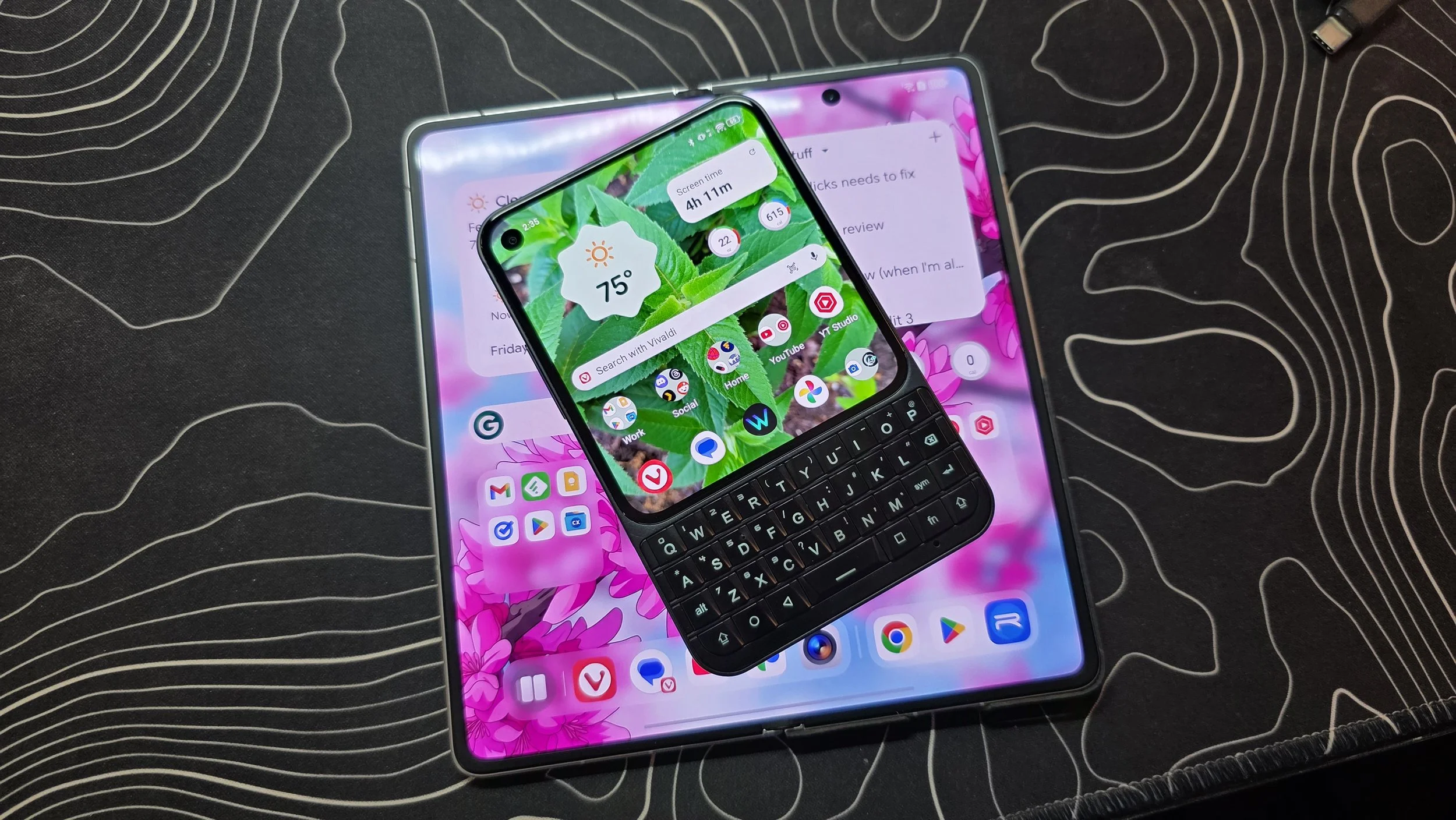
Even though it is ergonomically nice to just be carrying the Titan 2 Elite, it isn't the best phone in the world for everybody. Because of that squared-off screen, some apps might not offer the best experience, and multimedia is not going to be great. If you want to watch a movie or a TV show, this is not the device for it. The camera is decent if you use a GCam port, which helps bridge the gap, but the shortcomings are still there. Because of those limitations, people might still feel the need to carry a second slab phone, or like me, carry a folding phone to cover the rest of those use cases and finish covering all the bases.
This approach is essentially a complete inversion of the concept behind the power keyboard. With that accessory, you are primarily carrying a standard phone and then deciding to grab the keyboard whenever you think you might need it. This method flips that logic entirely on its head, because I am always carrying my keyboard phone. The Titan 2 Elite is the baseline, and then sometimes I will grab the folding phone to go along with it when I want those extra features.
That paradigm inversion is really what I am discovering about myself through this whole process. I don't want to try to turn a normal phone into a top-heavy, ergonomically awkward keyboard phone. I just want a dedicated, permanent keyboard phone in my pocket as my primary tool. When I need to take great pictures or want a proper multimedia experience, which doesn't actually happen super duper often for me, I can just grab that folding phone and carry it along as a secondary device.
Hardware vs. Add-ons
Beyond pure physical pocketability, choosing a dedicated keyboard phone yields several distinct workflow advantages. The Titan 2 Elite features fully capacitive keys, allowing you to swipe your thumb directly across the physical keyboard to scroll through web pages or long documents. The Clicks Power Keyboard lacks capacitive hardware entirely, leaving you with no scroll capabilities or cursor control without moving your hands back up to the glass. Because the Titan integrates the keyboard directly into the hardware, you get a robust custom app-launching setup through tools like Pastiera, mapping keys directly to system actions. Everything feels unified and entirely intentional.
This design choice fundamentally shapes your daily relationship with technology. Snapping an accessory onto a standard device is a completely different conceptual exercise than committing to a hardware form factor defined by a shorter, squared screen. If you want to use your device more intentionally, avoid doomscrolling, and stop mindlessly jumping from video to video, the Power Keyboard just isn't going to get you there. Snapping that accessory onto the back of your phone essentially amounts to duct-taping a keyboard, Frankenstein's monster style, to the exact same device that was already custom-built to steal your attention.
The Built-in Focus
Ultimately, the choice comes down to whether you view a hardware keyboard as a temporary tool for occasional productivity or as the literal core of your mobile workflow. For me, trying to treat it like a modular option made me realize that the friction of an add-on just isn't worth the trouble. If you really want that tactile, distraction-free typing experience, you might be better off committing to a device that was built for it from the very beginning. For my needs, having a dedicated keyboard phone in one pocket and the occasional folding screen in the other might seem excessive to some, but it provides a level of deliberate focus that no attachment will ever match.
