Is the Moto Razr Fold The Best Foldable You Can Actually Buy in the US?
Over the last year, my foldable journey has followed a very predictable pattern. I have picked up, tested, and thoroughly enjoyed a variety of different devices. I would find specific hardware elements or software tricks that I genuinely liked, but at the end of the testing cycle, I always found myself sliding my SIM card right back into the Galaxy Z Fold 7. Samsung’s flagship just remained my baseline comfort zone, the foldable benchmark that nothing else could quite unseat for my daily workflow.
That is why what I am about to say is going to sound a little shocking. Motorola, a brand that has spent the entire modern era of flexible screens strictly perfecting the flip phone formula with their Razr lineup, has swooped out of nowhere. They have built their very first book-style foldable, and they have cleanly stolen that top spot right out of Samsung's hands.
Now, we obviously do not know exactly how long this honeymoon period is going to last. The Galaxy Z Fold 8 is looming very large on the horizon and is coming incredibly soon, but right now, in this exact moment, the Moto Razr Fold is the absolute best book-style foldable you can buy. Best of all, you can order it directly online right here domestically in the United States, meaning there is absolutely no complicated importing needed to get it in your hands.
Hardware
On the hardware front, Motorola has walked a tightrope, carefully balancing premium components against a couple of intentional, calculated corner-cuts. To be clear, this is not the thinnest or the lightest book-style foldable around. When open, it measures 4.7mm thick, but it registers a hefty 243g on the scale. They also omitted MagSafe-style magnetic arrays from the back, an inclusion I really wish more companies would start prioritizing, especially on a device with this much footprint. But in the hand, it finds a very comfortable compromise right between the thinness of the Galaxy Z Fold 7 and the chunkier Pixel 10 Pro Fold, cleanly splitting the difference between the two domestic heavyweights.
While I do wish it were just a little bit lighter, part of what you are paying for in pure heft is a massive 6,000 mAh silicon-carbon battery that features blazing-fast 80W wired charging. This combination absolutely trashes the domestic competition from Google and Samsung, giving you massive capacity that easily justifies the extra physical bulk.
When it comes to the actual mechanics of the folding experience, the hinge feels pretty good. It completely avoids that stiff, stubborn tension that a lot of people complain about with the Galaxy Z Fold series, making it fairly easy to open up. Despite that smoother action, it still feels remarkably solid in daily use, comfortably holding its posture and staying open at pretty much any angle you throw at it. You get a nice little bit of pop right at the end of the motion to help lock it all the way open. I have noticed that occasionally, it does not open completely flat, which I know is something that triggers a lot of paranoia for certain users, but it is just a minor quirk that happens from time to time.
As for the crease, it looks pretty darn good. We are only a little over a week into testing this thing, but the initial impressions are highly encouraging. Now, to be fair, it is not quite on the level of the Oppo Find N6, but I would confidently place it somewhere in the same category as the Honor Magic V6. It is a shallow, well-disguised dip that looks great and easily lands the device in the upper echelon of crease design.
One hardware irritation is that the bottom mics happen to sit exactly where my pinky does when holding the phone with one hand. This means dictation can get a bit garbled as my finger moves around, covering the mic. The volume/power buttons are also placed entirely too high, much like Oppo. I still have no clue why anyone would think the buttons should be damn-near as high as possible. Put them where you thumb naturally rests! The phone is already a bit top-heavy, let’s not ask users to shift their grips to get to the volume buttons!
Another area where some might think Motorola cut a corner is under the hood. The phone runs the standard Snapdragon 8 Gen 5 rather than the top-tier, maximum-frequency Snapdragon 8 Elite Gen 5. If you are obsessed with tracking raw benchmark scores, you might see this as a downgrade. However, missing out on that Elite moniker is actually a major blessing in disguise. In benchmark testing, devices equipped with the power-hungry Elite processor start out with higher initial scores, but within just minutes of running through sustained stress tests, their performance drops significantly. Because the standard Snapdragon 8 Gen 5 in this Moto device doesn't thermally throttle like its Elite counterparts, its sustained performance actually ends up higher than the throttled elite chips. It turns out skipping that top tier was exactly the right call for real-world efficiency.
Where Motorola didn't hold back at all, though, is in the camera department. Instead of playing it safe, they went all-in with a massive triple 50MP sensor array. The primary shooter utilizes a physically large 1/1.28-inch sensor with a wide f/1.6 aperture, and it is flanked by a 50MP ultrawide and a dedicated 50MP 3x periscope telephoto lens. From a pure hardware standpoint, these sensors are physically massive, easily topping what Samsung and Google offer by a very wide margin.
Another great example of Motorola just packing in everything they possibly can is the inclusion of an active stylus. While Samsung chose to entirely remove stylus hardware compatibility on their outer screen to chase a thinner chassis, Motorola took the exact opposite path. They built full, active stylus support that works seamlessly across both displays. You get a massive internal 8.1-inch canvas for serious sketching or document annotation, and you can still comfortably jot down quick notes on the 6.6-inch cover panel without being forced to unfold the entire phone. It is exactly the kind of uncompromised functionality that a lot of Samsung power users have been begging for.
As for those screens themselves, you are getting an expansive 8.1-inch internal display and a highly usable 6.6-inch cover panel. Both are gorgeous LTPO pOLED screens, and while they do not quite hit the insane, blinding levels of brightness that Motorola advertises in their marketing material, they get plenty bright in the real world. In direct, outdoor sunlight, they sit right up there with the peak visibility of my Galaxy Z Fold 7, which is definitely more than good enough for daily use.
Unfortunately, they did make one frustrating layout mistake with the audio. When the device is completely open, Motorola placed both speakers on the left side of the frame. This means if you want a true, proper stereo soundstage for media, you have to physically rotate the entire device into a different orientation. Layout choices aside, the speakers themselves actually sound quite good. They deliver a full, bassy sound profile that ranks among the loudest I have ever heard on a foldable device. They do not get quite as piercingly loud as the Honor Magic V6, but they also manage to avoid getting harsh or grating when you push them all the way to maximum volume.
Software
Great hardware is only half the battle, though. If you pair a premium folding canvas with clunky, frustrating software, the entire experience falls apart. Fortunately, what Motorola has delivered here with Hello UI is a mixture of very good and, occasionally, even great software.
Leaning heavily into a clean, stock-Android approach is an immediate positive. The Quick Settings and notification shade on the internal screen look almost identical to a Pixel, making full use of the massive folding footprint. Material You integration is present in full force across the system, and there is absolutely zero attempt being made to awkwardly mimic iOS design language, which is fantastic.
The lone issue I’ve had with Hello UI is some weirdness with widget scaling. The Gradient Weather and Google Health widgets both look great on the inner screen, but break on the cover display. It’s like the DPI changes or something and that causes content to not load properly.
While the interface looks and feels cleanly lightweight, Motorola has packed in major productivity wins that completely outclass Google's barebones foldable software. The multitasking experience is phenomenal, standing neck-and-neck with what Samsung offers. You can easily run three applications at once in a side-by-side layout, or switch into a full-screen carousel view that lets you fluidly cycle between background apps. The only issue I’ve seen is that clicking links that open some apps will awkwardly toss you out of that carousel, sometimes in unexpected ways. Hopefully this is something Moto can work on.
Floating windows are also fully supported, allowing you to stack as many as you want, and their Smart Connect desktop mode is more than capable of handling serious workflows on a larger monitor even if there are a few odd quirks there too.
One weird thing to iron out with the mobile desktop is the fact that wallpapers often slide off the right when set. You’ll think you’ve got them ironed out and when you apply it, it’ll move. On the phone itself, this can be avoided by using the little crop button, but here, there seems to be no solution. Apps also can’t really maximize, but instead opt for full-screening, which means they lose their control bar up top. While the phone can be used as a trackpad, I would love to be able to turn the screen off as well.
Speaking of that mobile desktop experience, the Smart Connect application for your computer is also a massive high point for me. It allows you to do a ton of really impressive things, like running that dedicated desktop environment directly inside a window on your PC. Beyond that, you can seamlessly stream individual applications from your phone to your computer screen, check and respond to text messages, browse through your photos, and move files back and forth with zero friction.
They also built in an incredible continuous control feature that lets you use a single mouse and keyboard to control both your computer and your phone. Your cursor literally glides from the edge of your PC monitor right onto your phone screen. Your clipboard automatically syncs in the background, too, so if you copy a block of text or a link on your computer, it is instantly available to paste right on your phone. It all ties together beautifully and just works.
The software depth here feels like a massive leap forward compared to the time I spent with the Moto Razr Plus 2025. It still does not quite match the hyper-polished, micro-optimized feel of Google or Samsung's latest builds, but it is really damn close. And, Moto didn’t forget to add those fun Kinetic Gestures that let you do a double-twist or chopping motion to trigger your camera or flashlight.
Moto has promised 7 years of updates for this device, which is definitely a great start, but we need to see what that looks like before we praise them heavily. 7 years of updates every 6 months with major versions a year behind would still count, but it wouldn’t be fun. Hopefully Moto can commit to picking up the pace, which they’ll need to do in order to help buyers justify buying such an expensive device.
Battery
When you drop a massive 6,000 mAh battery into a device and pair it with the highly efficient standard Snapdragon 8 Gen 5 processor, the results speak for themselves. The battery life on this phone is absolutely phenomenal.
I can use this device in my normal everyday manner, logging between 4 to 6 hours of screen-on time, and comfortably head to bed with 40% of my battery still left in the tank. Taking the phone off the charger at 6:30 a.m. and pushing it all the way to 9:30 p.m. still leaves me with almost half of my battery remaining. If you were to pace yourself and be just a little bit conservative, this could easily stretch into a true two-day phone.
To put that into context against the rest of the foldable market, nothing from Google or Samsung even comes close. In fact, out of all the folding devices I have tested over the past year, only the Honor Magic V6 has managed to land in this exact same elite category of battery endurance.
Camera












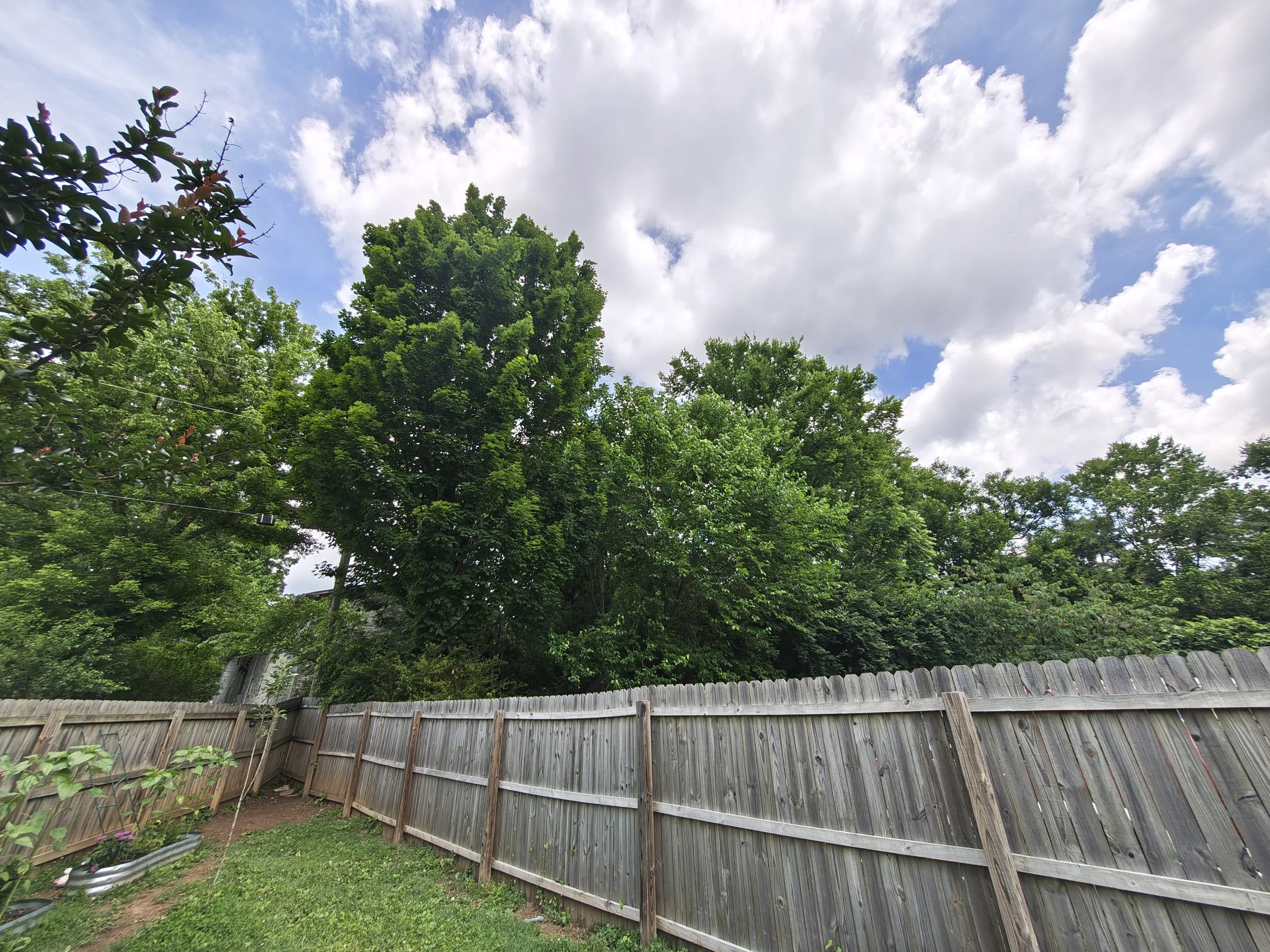
When it comes to the cameras, we once again find ourselves evaluating how Motorola has paired their impressive hardware choices with their software processing. In this instance, they have succeeded in matching that great hardware with good, and occasionally even great, camera software.
Images captured on this device tend to be extremely detailed, and I absolutely love the highly contrasted look. It honestly reminds me a lot of older Pixel phones back when Google's photography processing was a bit more aggressive and distinct, before they started tuning their cameras to look more generic to appeal to every single user on earth. That said, it does fall short of being quite as contrasted and heavily stylized as the Oppo phones I have tested in the past, finding a nice middle ground. The colors have a distinct pop to them that borders on unrealistic, but it usually falls just short of looking cartoonish in the way older Samsung photos used to look.
The only real issue I have encountered with the processing is that the camera does occasionally lean into an overexposed, overly bright look that a lot of Chinese OEMs seem to be chasing these days. I really wish there was a toggle or a setting hidden in the camera menus that would let me permanently dial that exposure back just a bit, without needing to use pro mode. Fortunately, it is not a massive complaint because the rest of the processing and detail retention looks natural enough for me to be generally happy with the output.
The telephoto zoom performance is fantastic, and everything looks incredibly sharp up to about 8x. Once you push past 10x, things do start to degrade in a noticeable way. At those higher digital stretches, Motorola uses AI enhancement to try and clean up the image. You can turn this feature off if you want, and honestly, the results are a mixed bag; sometimes you get a surprisingly clean shot, and other times things can look a little weird. But let's be realistic, shooting past 10x on a foldable, or any phone in general, is pushing things a bit too far anyway. Anything from 6x and in looks excellent and essentially lossless. I have been having a blast using that telephoto lens to capture macro shots of flowers, insects, and spiders, and it does a truly fantastic job with close-up detail.
Even the video performance holds up well. I have noticed a tiny stutter in my footage once or twice, but it has been incredibly rare. The stabilization is smooth, the detail is high, the colors look nice, and the autofocus is generally very solid.
Taken as a whole, if you were to ask me right now whether I would rather use the camera system on the Galaxy Z Fold 7 or the Pixel 10 Pro Fold, I am taking this Motorola camera any day of the week. It features better raw hardware, and the software is more than good enough to ensure that the final output is better than what Google and Samsung are currently producing domestically. Most of the time, it isn't even really close.
Moto AI
If there is one major aspect of this device that registers as a massive swing and a miss, it is Motorola's obsession with Moto AI. They have baked in their own proprietary large language model to serve as their version of Gemini, and the reality is that most people are probably just never going to use it. All of the features Moto AI brings to the table are simply better accomplished by Gemini anyway, which you can easily pull up by holding down your power button.
Despite that, Motorola is so confident you will want to interact with their software that they actually added a physical, dedicated button specifically for Moto AI right next to the volume rockers. To make matters worse, you cannot remap this button to anything else; it is permanently locked to Moto AI features.
The closest thing I have found to a useful feature tied to this button is called "Catch Me Up." You can double-click the button, and the system will generate a text summary of your recent notifications. There is also a feature that acts as a direct clone of Pixel Screenshots, where the phone scans and remembers your captured images so you can recall the information later. If that kind of visual memory bank is something you personally find valuable, it might be a cool inclusion for your workflow, but it is just not something I am ever going to use.
Forcing a dedicated physical button onto the frame for these features feels completely unnecessary, and it actively creates annoying ergonomic problems. If you have bigger hands, thumbs, or fingers, it is far too easy to accidentally press the wrong thing or have a hard time differentiating between the keys when you are blindly feeling for the side of the device. Motorola really did not need to place a physical button up there. They should have just relied on Gemini for the heavy lifting and spared the phone's chassis from the extra clutter.
Conclusion
At the end of the day, no device is completely perfect. The Motorola Razr Fold absolutely has its share of first-generation growing pains, whether you are dealing with a handful of annoying widget scaling glitches, a couple of desktop mode quirks, or physical layout frustrations like the high button placement and that lopsided landscape speaker array.
But even with those minor caveats, it is incredibly hard for me to not declare this phone a massive triumph. Motorola didn't just step into the ring with Google and Samsung, they fundamentally out-engineered them on the hardware front where it matters most to daily users. If you are deeply adventurous and completely willing to go through the hassle of importing a device from overseas, you might be able to track down an imported option that squeezes past this in absolute thinness. But for the vast majority of normal users who want a device they can actually buy right here domestically, this is not just a viable alternative. This is, at least as far as I can tell, the best book-style foldable available on the US market right now.
